1. Quick start
- Open the game and press Open the candy shop.
- Look at the counter: each lane is one market. A candy above the candy-cane line is up, one below it is down.
- Click in a lane above or below its candy to set a cup there: right click = green BUY cup, left click = red SELL cup.
- Or click a candy to grab it right now: right click buys, left click sells.
- Watch your trade: the 🐜 sugar ant waits at your stop, the 🎁 gift box at your target. Press Put a lid on it once you are in profit.
2. The candy counter
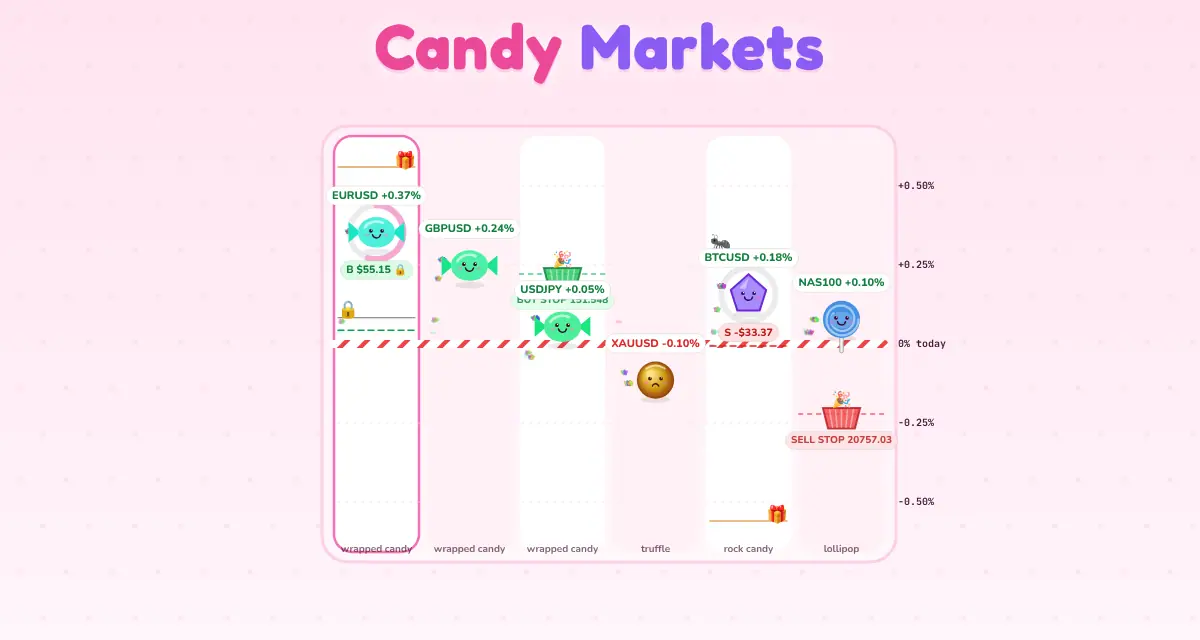
- Height = % move. A candy's height is how far its price has moved over the time frame you pick at the top (1m, 5m, 15m, 1H, 4H or Today). The scale on the right shows the %.
- Happy or sad. Candies smile when they are up and frown when they are down.
- ✨ Sprinkles are the trail: where the candy has been over the time frame, oldest at the left of the lane.
- Up to 8 lanes show at once (fewer on small screens). If your watchlist is longer, the others take turns every 45 seconds. Markets you hold or have a cup on always stay.
3. Which candy is which
| Candy | Market type | Examples |
|---|---|---|
| 🍬 Wrapped candy | Forex | EURUSD, GBPJPY, USDJPY |
| 💎 Rock candy | Crypto | BTCUSD, ETHUSD, SOLUSD |
| 🍫 Gold truffle | Metals | XAUUSD, XAGUSD |
| 🍭 Lollipop | Indexes | NAS100, US30, GER40 |
| 🟠 Gumdrop | Energy | WTI, Brent, natural gas |
| 🧁 Macaron | Stocks and anything else | AAPL, TSLA |
4. Cups: pending orders
A cup waits at a price level. When the candy reaches it, it drops in and your order fills, with your stop and target attached. The game picks the order type from where you put the cup:
| Cup | Where you put it | Order it places |
|---|---|---|
| 🎉 Popper | Green buy cup above the candy, or red sell cup below it: the price has to run into it | Stop order (buy stop / sell stop): catch the breakout |
| 🧁 Cupcake | Green buy cup below the candy, or red sell cup above it: the price has to come back to it | Limit order (buy limit / sell limit): buy the dip, sell the pop |
Click a cup (or its ✕ in the panel) to take it away. In live mode you are asked to confirm first.
5. Grab: market orders
Click a candy to trade it at the market price now: right click buys, left click sells. You can also select a candy (click its lane or use ← →) and press your sell / buy keys (J / K by default) or the big Grab · Sell and Grab · Buy buttons.
The game follows the FIFO rule: if you already hold one side of a market, close it before trading the other side.
6. Your trade in the lane
- Dotted line: your entry price.
- 🐜 Sugar ant: your stop loss. If the price reaches it, the ant eats the candy and the trade closes.
- 🎁 Gift box: your take profit. Reach it and the trade closes with your profit.
- Frosting ring: the ring around the candy fills as the trade moves toward the target.
- 🔒 Put a lid on it (lock-in): once a trade is in profit, its stop moves to break-even and then trails behind the price. With Auto lid on (in ⚖️ Risk per trade) it happens by itself once the trade is up by the $ amount you set plus commission.
- The ⋯ button next to a trade in the jar closes all of it, closes half, or puts a lid on it.
Your stop size (% of price) and target (× the stop) are set in ⚖️ Risk per trade, with the size of every trade: % of balance, a fixed $ risk, or fixed lots. Size is worked out from the stop, so a stop-out loses only the risk you set.
7. Sweet Streak, the tray and the Sweet Shop
- ⭐ Sugar Stars reward planned exits: a trade that closes at its own target (+12), at a stop after a lid (+8) or at its stop loss (+4, for respecting your stop). Each trade you lock with the Put a lid on it button earns +2. Stars from trades stop after 20 trades a day, so they reward how you trade, not how much.
- The candy tray (bottom of the screen): every trade that closes in profit drops its candy in the tray. Three of the same candy make a Sweet Combo: +25 stars.
- 🍭 Sweet Shop: spend stars on shop themes: Pink Parlor (free), Mint Dream, Lemon Drop, Chocolate Factory and Midnight Neon.
Sugar Stars are game points only. They buy nothing outside the game.
8. Fun Mode (match-3)
Press 🎮 Fun Mode for a match-3 board made of the same six candies. Swap two neighbouring candies (click one, then its neighbour, or swipe) to line up 3 or more. Chains score more each time they fall into new matches.
- 🔥 Hot candy: the candy type of the market moving the most right now (from your watchlist) scores double and glows gold.
- You get 30 moves a game. Your best score is kept, and every 400 points earn a Sugar Star (up to 30 a game).
- Fun Mode never places trades. Trades you already have keep running in the jar while you play; press Back to trading to see them.
9. The panel
| Part | What it does |
|---|---|
| Practice / My MT5/MT4 | Switch between pretend money and your own linked account. |
| 🛑 Kill switch | Closes every trade, cancels every cup and blocks new orders until you reset it. |
| 🫙 Candy jar | Your open positions with live profit or loss. |
| 🧁 Cups set | Your waiting orders. |
| ⚖️ Risk per trade | Size, stop, target and the auto lid. |
| 🍬 Candies on the counter | Your watchlist: add markets, remove them, load your global watchlist from My Game Account, or Auto-pick the movers. |
| ⌨️ Keys | Change the sell and buy keys. |
| ⚙️ My account | Opens My Game Account over the game (risk profiles, linked accounts, keys). |
Every panel can be dragged by its grab bar and minimized. On a phone, the panel opens with ☰ Menu, and tapping a candy or a lane asks whether you want to buy or sell.
10. Practice and your MT5/MT4
Practice uses real market prices from the LPS feed and $10,000 of pretend money. Members can switch to My MT5/MT4: with the LPS Link EA (1.31 or newer) running in MetaTrader on your PC or VPS, every grab is a market order and every cup a real stop or limit order on your own account, with your stop and target. Real-money accounts ask you to confirm each order. In live mode the 📋 orders list under the panel shows your MetaTrader orders and positions, like the Trade tab, so you can close or cancel any of them.
11. Controls
| Input | Action |
|---|---|
| Right click / Left click on a candy | Grab: market BUY / SELL |
| Right click / Left click in a lane | Green BUY cup / red SELL cup at that level |
| Click a cup | Remove it |
| J / K (or 1 / 2) | Grab the selected candy: SELL / BUY |
| ← → | Select a candy |
| Esc | Close windows |
| Fun Mode: click, click (or swipe) | Swap two neighbouring candies |
12. Questions and fixes
| Problem | Fix |
|---|---|
| "That is right on the price". | A cup has to be away from the price. Click the candy itself to trade now. |
| My cup never fills. | The candy hasn't reached it yet. Take it away and set it closer. |
| A longer time frame looks flat at first. | Prices are kept on your device as you play, so 1H and 4H fill in over time. |
| Live: nothing happens. | Check the Link EA is running with Algo Trading on, it is version 1.31 or newer, and the kill switch is off. |