Quick start
- Press Open the greenhouse. You start in Practice: real market prices from the LPS feed, a $10,000 pretend balance.
- Open the 🌱 Seed Catalog and click a market to hold its seeds. The row shows its plant, its flower, its % move today, its growth chart and a forecast.
- Click an empty spot in the greenhouse: right click pots a BUY on the soil, left click hangs a SELL from the fence. You can also press your buy and sell keys (K and J by default), or use the Pot ↑ and Hang ↓ buttons in the catalog.
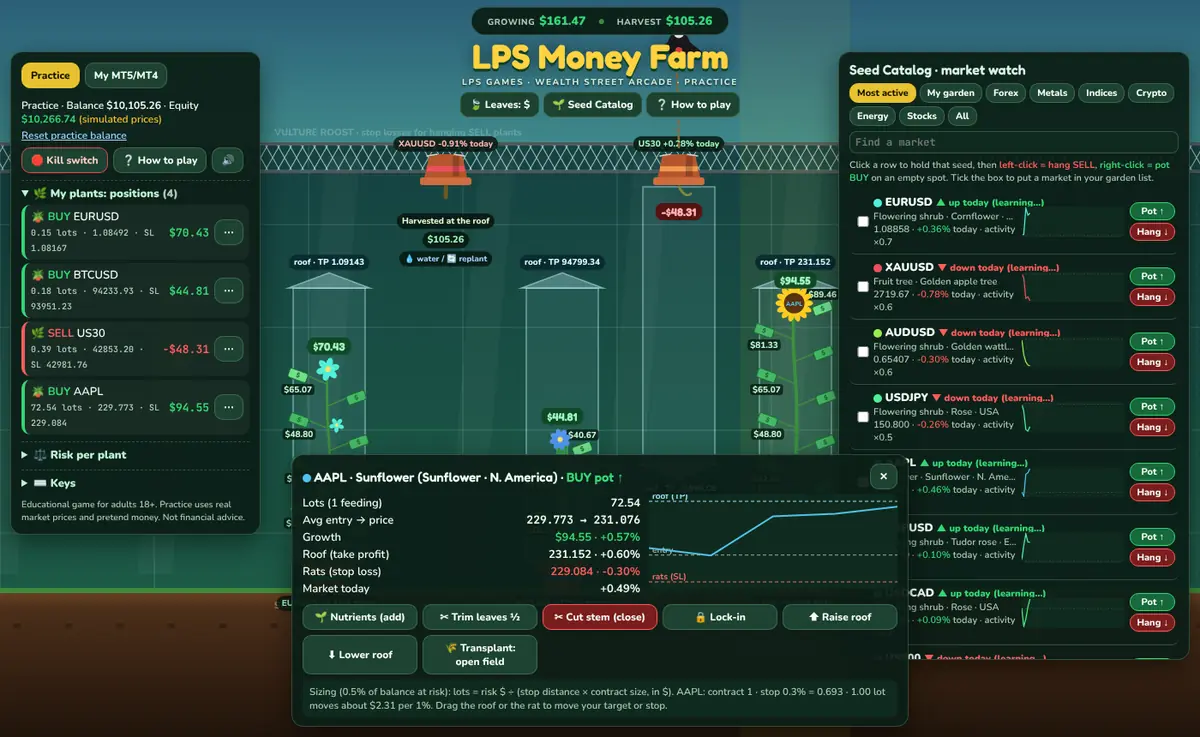
- Watch it grow. Click a plant to open its tools: add nutrients, trim leaves, cut the stem, raise the roof or lock it in.
The plants: one per market
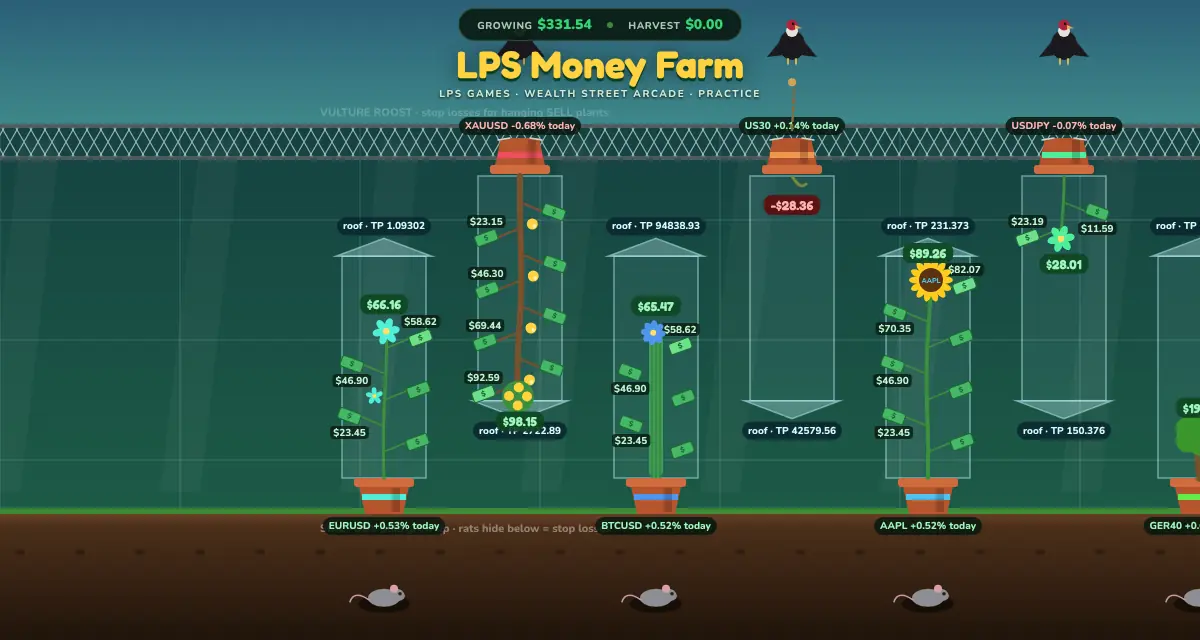
Each kind of market grows a different plant, and each pair has its own flower colour so you can tell them apart at a glance.
| Market | Plant | Examples |
|---|---|---|
| Forex | Flowering shrub with the national flower of the first currency's country | USD rose (USA) · EUR cornflower · GBP Tudor rose · JPY cherry blossom · CHF edelweiss · AUD golden wattle · NZD kōwhai · CAD maple · MXN dahlia · ZAR king protea |
| Metals | Fruit tree with metal fruit | Gold = golden apple tree · Silver = silver pear tree · Platinum = platinum plum tree |
| Indexes | A tree native to the index's region | US30 Southern live oak · US500 giant sequoia · NAS100 coast redwood · GER40 linden · UK100 English oak · JPN225 cherry tree |
| Crypto | Desert cactus | BTC golden barrel cactus · ETH blue agave · SOL night-blooming cereus · XRP prickly pear |
| Energy | Wildflower | US oil Texas bluebonnet · UK oil Scottish heather |
| Stocks | Sunflower with the ticker in its centre | AAPL, NVDA, TSLA… |
The label on each pot shows the market and its % move today, measured from the market's real daily open, like every LPS game.
The greenhouse
| Where | What it means |
|---|---|
| Pots on the soil | BUY trades. They grow up when the price rises. |
| Plants hanging upside down from the chain-link fence | SELL trades. They grow down when the price falls. |
| Under the soil | The rats: stop losses for buy pots. |
| Above the fence (the vulture roost) | The vultures: stop losses for hanging sell plants. |
Each plant has its own spot. Walk the greenhouse with the mouse wheel or the ← → keys. Click any plant to select it.
Money leaves
As a trade makes money, its plant grows and green dollar-bill leaves come out on the branches. Each leaf shows the profit at that height, so the top leaf (and the tag above the plant) is your whole profit. Press 🍃 Leaves at the top to show them in $ or %. More nutrients (more positions) make bigger leaves.
When a trade is losing, the plant wilts back into its pot and a root drops toward the rats (buy) or climbs toward the vultures (sell). The tag shows the loss in red.
The roof: your take profit
Every plant grows inside a little glass greenhouse. Its roof is your take profit: the plant can only grow that tall. When it touches the roof, it is harvested and the money goes into your Harvest total.
- Drag the roof up or down to move your target. It can't be dragged past the plant's current height (that would cross the price).
- ⬆ Raise roof / ⬇ Lower roof move it by a quarter each time.
- 🌾 Transplant: open field takes the roof away (no take profit), so the plant can keep growing until you cut it. 🏡 Back under a roof puts one back.
Rats and vultures: your stop losses
Rats hide under the soil below every buy pot. Vultures wait above the fence over every sell plant. Each one sits at that plant's stop loss. When the plant's root gets close, their eyes turn red. If the price reaches your stop, they eat the plant and the trade closes at the stop.
- Drag a rat or vulture to move your stop. It can't be dragged past the current price.
- 🔒 Lock-in puts the rat or vulture in a gold cage: your stop moves to break-even and then trails behind the plant. A trade closed by the trailing stop counts as a harvest. Turn on Auto lock-in in ⚖️ Risk per plant to lock in automatically once a plant has made your set dollar amount plus commission.
Gardening tools
| Tool | What it does to your trade | Key |
|---|---|---|
| 🌱 Nutrients | Adds another position, same direction, same stop and roof. The plant grows faster and its leaves get bigger. | N |
| ✂ Trim leaves ½ | Takes half the profit: closes half of every position on that plant. | T |
| ✂ Cut stem | Closes the whole trade and harvests (or cuts the loss). | C |
| 🔒 Lock-in | Stop to break-even, then trailing. | L |
| 💧 Water (stump) | After a plant is cut or eaten, watering the stump plants the same market the same way again (a new trade). | W |
| 🔄 Replant | Puts the seed in your hand into that spot instead (buy ↑ or sell ↓). | |
| 🗑 Remove pot | Clears an empty spot. |
The same actions are in the ⋯ menu next to each plant in the 🌿 My plants list, under your balance. The red ✕ there cuts the whole trade in one click.
Seed Catalog and forecasts
The Seed Catalog is your market watch. It opens minimized like every LPS market list; click its title or 🌱 Seed Catalog to open it. Tabs: Most active (the markets moving most right now for their kind), My garden (your own list), Forex, Metals, Indices, Crypto, Energy, Stocks and All. You can also search.
Each row shows the market's growth chart with a dashed line at today's open, and a forecast cone: the straight-line trend of the recent prices this device has seen, carried forward, with a band for normal wiggle. ▲ grow up suggests a pot (buy), ▼ grow down suggests hanging it (sell), ◆ sideways means no clear trend. While the game is still learning a market (its first minute), the forecast uses its move today.
Tick the box on any row to put it in your garden list, or load your global watchlist with ⭐ My watchlist. 🌱 Plant my garden by forecast plants every market in the list that has a clear forecast and isn't already growing.
Risk and sizing
Open ⚖️ Risk per plant to choose how each new plant is sized: % of balance at risk, a fixed $ risk, or fixed lots; your stop % (how far the rats or vultures start) and your roof as a multiple of the stop.
Sizing math: lots = risk $ ÷ (stop distance × contract size, in $). The tools panel of every plant shows the numbers for that market, including how many dollars one lot moves per 1%.
Plants follow FIFO: you can't hold a buy and a sell on the same market at once. Cut one before planting the other side.
Playing on your MT5/MT4
Members can press My MT5/MT4 to play on their own linked account through the LPS Link EA (1.31 or newer), on lpsnetwork.com:
- Planting sends a market order with your risk, stop and roof. Nutrients send another one. Trim closes half, Cut closes the trade, dragging the roof or a rat/vulture moves your target or stop on MetaTrader.
- Real-money accounts ask you to confirm every order.
- Your MetaTrader positions and pending orders show in the dropdown under your balance, and your other linked accounts are listed below it.
- The 🛑 Kill switch closes every trade and cancels every order on the account.
- Plants show only trades opened by LPS games on that account.
Set up your account, keys and risk profiles in ⚙️ My account, which opens over the game.
All controls
| Control | Action |
|---|---|
| Right click on an empty spot / K | Pot a BUY with the seed in your hand |
| Left click on an empty spot / J | Hang a SELL with the seed in your hand |
| Click a plant | Select it and open its tools |
| Drag the roof / a rat / a vulture | Move the take profit / stop loss |
| N T C L W | Nutrients · Trim · Cut · Lock-in · Water (selected plant) |
| Mouse wheel, ← →, swipe | Walk along the greenhouse |
| Esc | Close windows |
| Phones and tablets | Tap an empty spot to choose Pot a BUY or Hang a SELL |
The sell and buy keys can be changed under ⌨️ Keys. Every menu has a grab bar on its left side to move it, and a – button to minimize it.
Questions
Why did my plant turn into a stump?
The trade closed: it reached its roof (harvested), the rats or vultures ate it (stop loss), the trailing stop took the profit after a lock-in, or you cut it. The stump shows which, and what it made or lost.
Why is the forecast "learning"?
The game builds each market's growth chart from the prices it sees while you play (every 2 seconds). Leave it open a minute or two and the forecast cones fill in.
Is practice money real?
No. Practice uses real prices with a pretend $10,000 balance. You can reset it from the panel.