1. Quick start
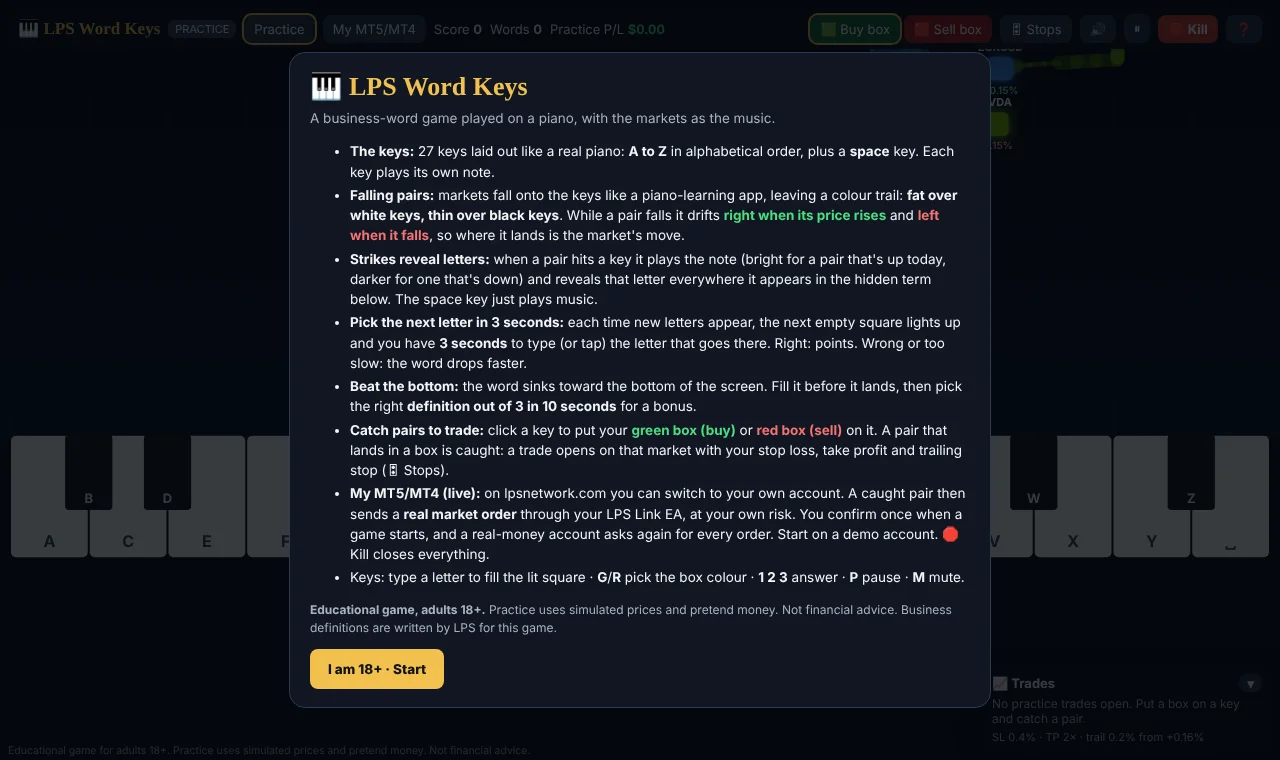
- Open LPS Word Keys from the LPS Games page, or walk up to the purple 🎹 LPS Word Keys cabinet in the Wealth Street arcade and press F.
- Read the start card and press I am 18+ · Start. You begin in Practice with simulated prices and pretend money.
- Watch the markets fall onto the piano. Each one that lands plays a note and shows its letter in the word if that letter is in it.
- When the next empty square lights up blue, type the letter that belongs there within 3 seconds.
- Fill the word before it sinks to the bottom, then pick the right definition out of three within 10 seconds.
- Optional: click a key to place your green buy box or red sell box above it. A market that lands in a box becomes a trade.
2. The screen
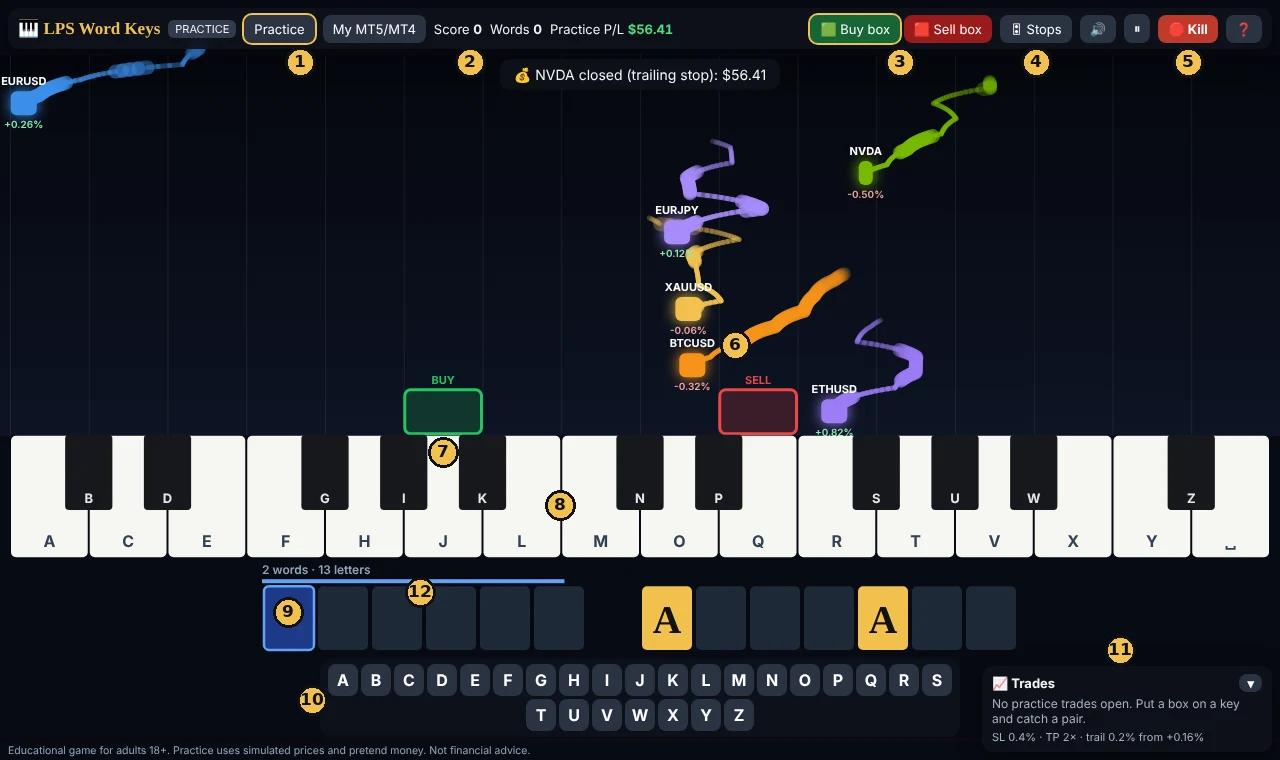
- 1Practice / My MT5/MT4: pretend money, or your own linked account.
- 2Score, words solved and your practice P/L (or your account in live mode).
- 3Buy box / Sell box: choose which box a click on the piano places.
- 4🎛 Stops: stop loss, take profit and trailing stop for every caught market.
- 5🛑 Kill: closes every trade and blocks new ones until you reset it.
- 6A falling market with its name, today's % and its colour trail.
- 7Your box sitting above a key. Green buys, red sells.
- 8The piano: 27 keys, A to Z and space.
- 9The word board. The blue square is the one to fill now.
- 10Letter pad: tap a letter (or type it on your keyboard).
- 11📈 Trades: open trades, their P/L and a Close button. ▾ folds it.
- 12The 3-second bar: how long you have left to pick.
The top bar also has 🔊 (sound on or off), ⏸ (pause) and ❓ (help).
3. The piano

The letters run in alphabetical order across the keys exactly as notes run on a real piano, so some letters land on the thin black keys: B, D, G, I, K, N, P, S, U, W and Z. Every key has its own note, so as markets land the piano plays a tune. The space key plays a note too, but it never reveals anything.
4. Falling markets
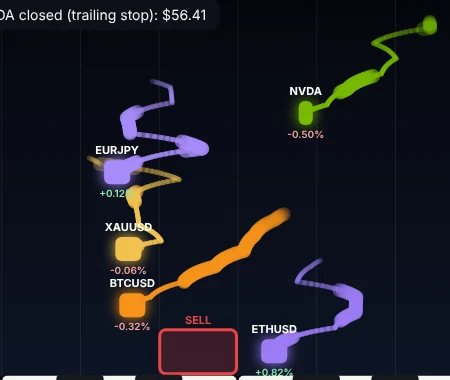
Markets (currency pairs, gold, silver, oil, indices, crypto and stocks) fall from the top onto the piano, one after another, the way notes fall in a piano-learning app. Each takes about 6 seconds to land.
Where it lands is the market's move. The middle of the keyboard is the 0% line (the dashed gold line). A market that is up goes to the right and one that is down goes to the left, as far as its % move: twice the move, twice as far from the middle. The labels along the top show the scale (for example −0.5% … 0% … +0.5%); it widens when a market makes a big move, so every market stays on the keys. As the price changes while it falls, the market slides left or right with it.
Trails: the trail is fat over a white key and thin over a black key, so you can see which kind of key it is heading for.
The small number under each market is its % move today. When it lands, the key flashes green and plays a bright note if the market is up today, or flashes red with a darker note if it is down.
5. Revealing and picking letters
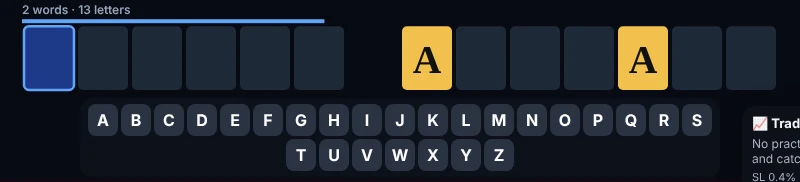
Markets reveal letters
When a market lands on a key, that letter is shown everywhere it appears in the hidden term, like Wheel of Fortune. Above the board you can see how many words and letters the term has.
You pick the next letter in 3 seconds
Whenever new letters appear, the first empty square lights up blue and a bar starts running down. Type (or tap) the letter that belongs in that square before the bar runs out.
| What happens | Result |
|---|---|
| Right letter | +100 points, the square fills, and the next empty square lights up straight away |
| Wrong letter | The word sinks 4 seconds' worth faster |
| Too slow (bar runs out) | The word sinks 2 seconds' worth faster |
Beat the bottom
The word board sinks slowly toward the bottom of the screen. A full trip takes 75 seconds, minus any penalties. Fill every square before it lands. If it reaches the bottom, the word and its meaning are shown and a new word starts.
6. The definition quiz
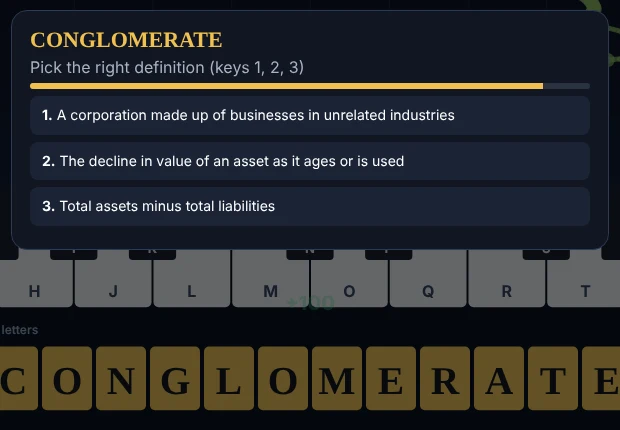
As soon as the word is complete you get three definitions. Pick the right one within 10 seconds by clicking it or pressing 1, 2 or 3.
The right answer turns green. If you picked wrong, your choice turns red and the right one shows in green, so you learn it either way. The next word starts a moment later.
About 150 terms come up in a shuffled order: accounting, banking, investing, trading, economics and real estate. Every definition is written in plain English for this game.
7. Scoring
| Action | Points |
|---|---|
| Right letter in the 3-second pick | +100 |
| Word finished | up to +200 (more the higher the word still is) |
| Right definition | +500 |
| Catching a market in a box | +50 |
Your score and the number of words you have solved are kept on this device between games. Trade results are tracked separately: Practice P/L in practice, your real account balance and equity in live mode.
8. Catching markets: trades
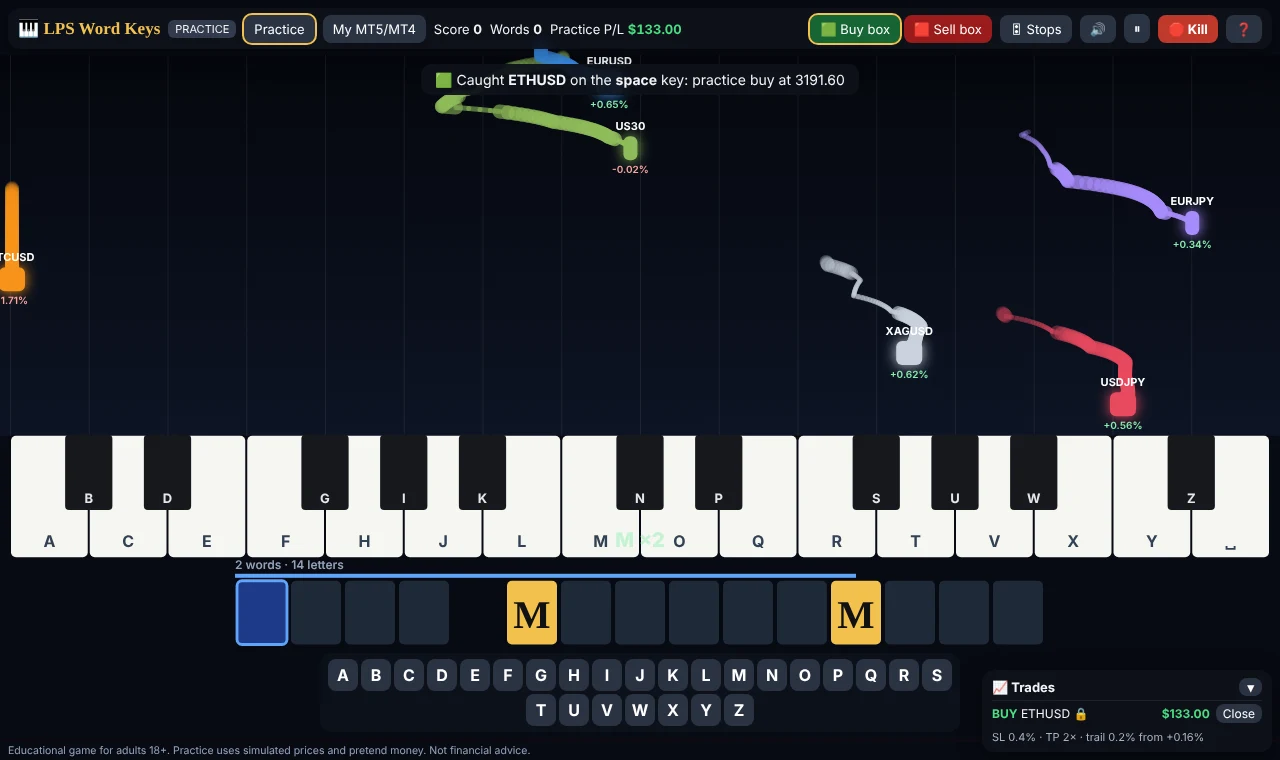
- With a mouse: left-click a key for a red sell box, right-click a key for a green buy box. Click the same key again to remove it, or another key to move it. You can have one green and one red box out at a time.
- On a phone or tablet: choose the colour with 🟩 Buy box or 🟥 Sell box (or G / R), then tap a key.
- Too fast to box? Click the falling market itself: the left button sells it at the bid and the right button buys it at the ask, right now.
- Any market that lands in a box is caught: a trade opens on that market, buy for the green box and sell for the red one. The box is then used up, so place it again for the next catch.
9. Stops, targets and trailing stops
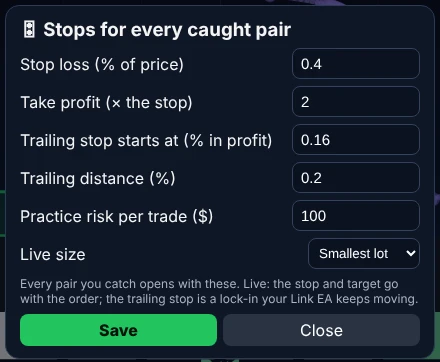
| Setting | What it does |
|---|---|
| Stop loss | Closes the trade at this % against you. Default 0.4%. |
| Take profit | Closes at this many times the stop in your favour. Default 2× (0.8%). |
| Trailing stop starts at | Once the trade is this % in profit, a trailing stop switches on. Default 0.16%. |
| Trailing distance | The trailing stop follows the price at this distance and never moves back. Default 0.2%. |
| Practice risk per trade | Pretend dollars lost if the stop is hit. Default $100. |
| Live size | Your account: the smallest lot your broker allows, or sized to risk the $ amount above. |
10. Practice and your MT5/MT4

Practice is open to everyone: simulated prices, pretend money, nothing leaves the game.
My MT5/MT4 is for LPS members on lpsnetwork.com with a linked account and the LPS Link EA running in MetaTrader:
- The markets that fall are your broker's symbols at your broker's prices.
- A market caught in a box sends a real market order to your account with your stop loss and take profit. The trailing stop is sent as a lock-in that your EA keeps moving.
- You confirm once when you switch to your account. On a real-money account, every order asks again before it is sent. A demo account doesn't ask.
- Your risk profile (My Game Account) still applies: maximum risk per trade, maximum open trades, and whether real accounts are allowed.
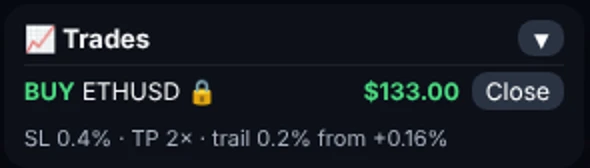
- The 📈 Trades panel shows the trades this game opened, with live P/L and a Close button. 🛑 Kill closes everything on the account and blocks new orders until you press Reset kill switch.
11. Controls
| Key or action | What it does |
|---|---|
| A to Z | Type the letter for the blue square |
| Left-click a piano key | 🟥 Red sell box above that key (again removes it) |
| Right-click a piano key | 🟩 Green buy box above that key |
| Left / right-click a falling market | Sell it at the bid / buy it at the ask, at once |
| Tap a piano key (phone) | Put your selected box above that key |
| G / R | Choose the green (buy) or red (sell) box. These two letters choose a box only when no square is waiting for a letter. |
| K / J (your choice) | Drop the 🟩 buy box (K) or 🟥 sell box (J) at once, under the next market to land, or under your mouse pointer. Change the keys and the mode with ⌨️ Keys. While a square waits for a letter, J and K are letters. |
| 🎹 Free play | Just play the piano: every letter key and the space bar plays its piano key, and you can tap the keys. Esc or 🎮 Back to the game returns. |
| 1 2 3 | Answer the definition quiz |
| P or ⏸ | Pause and resume |
| M or 🔊 | Sound on or off |
| Esc | Close the Stops window, or leave the game when playing in the Wealth Street arcade |
12. Playing on a phone
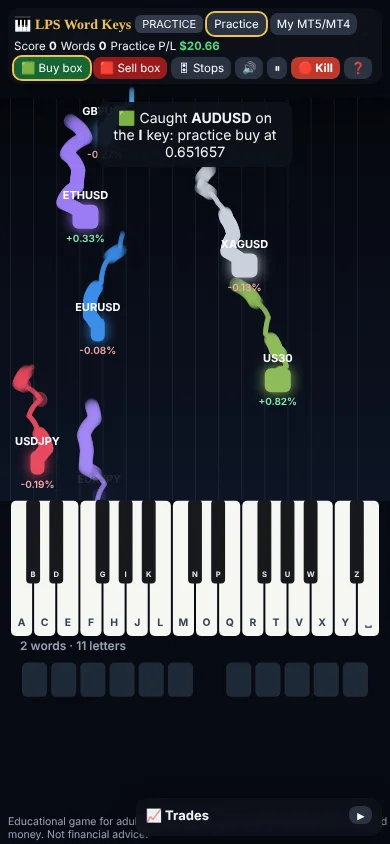
- Tap a piano key to place your box, and tap the letter pad to pick letters.
- The letter pad shows 13 letters a row so it fits under the word.
- 📈 Trades starts folded on phones: tap ▸ to open it.
- Turning the phone sideways gives the keys more room.
- Turn the sound on: hearing whether a key is struck green (bright) or red (dark) is part of the fun.
13. Sounds, drums and key ranges
Press 🎻 Sounds to choose what the piano sounds like. There are 36 instruments and kits:
| Group | Instruments |
|---|---|
| Keys | Grand piano, electric piano, organ, harpsichord, accordion |
| Orchestra | Strings, choir, harp, flute, clarinet, brass |
| Strings | Steel and nylon guitar, banjo, sitar, electric bass |
| Mallets | Marimba, vibraphone, bells, celesta, music box, kalimba, steel drum |
| Winds and synths | Saxophone, whistle, synth lead, synth pad, synth bass, acid bass, 8-bit, theremin, cash register |
| Drums | Drum kit, 808 drum machine, Latin percussion and sound effects: every key is a different drum (kick, snare, hi-hats, toms, cymbals, cowbell, congas, bongos, timbales, claves and more) |
- Whole keyboard: the sound every key makes, in the game and in 🎹 Free play.
- Low, middle and high keys (A–I, J–R, S–space) can each have their own instrument: drums on the left, bass in the middle and strings on the right, for example.
- Each pair can have its own instrument, so you can tell markets apart by ear: gold on the steel drum, EURUSD on the marimba. A pair's own instrument wins over the keyboard's.
- Key ranges: give a pair a From and To key and it only falls between them. Its 0% sits in the middle of its range, with down moves to the left and up moves to the right, as far as its % move. Use at least 3 keys. Leave both on "all" for the whole keyboard.
- ▶ plays a pair's sound on its lowest, middle and highest key. Reset all to piano undoes everything.
14. Where to find it
- LPS Games page: LPS Word Keys → Play now.
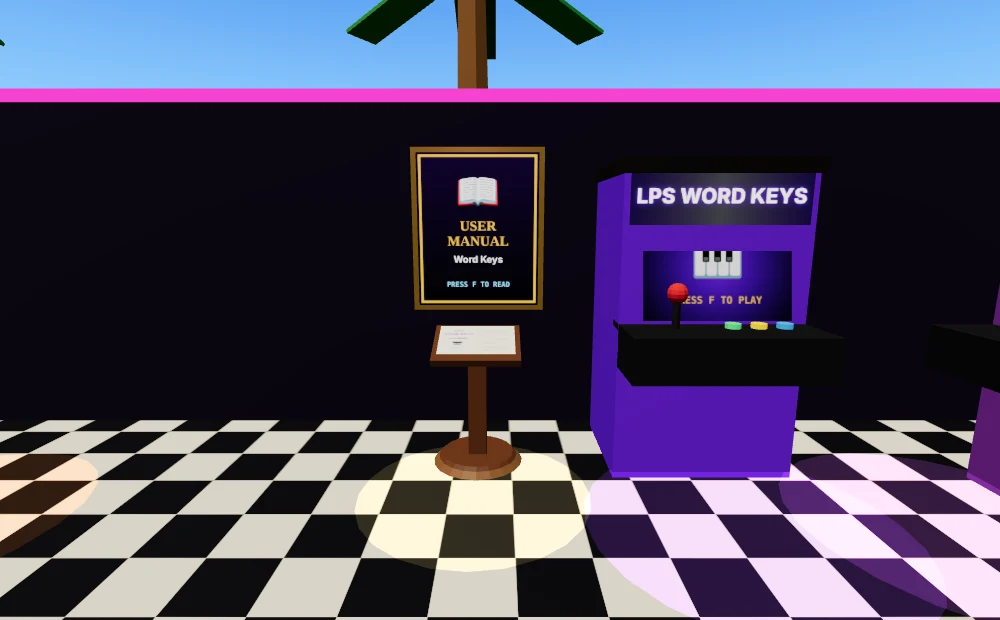
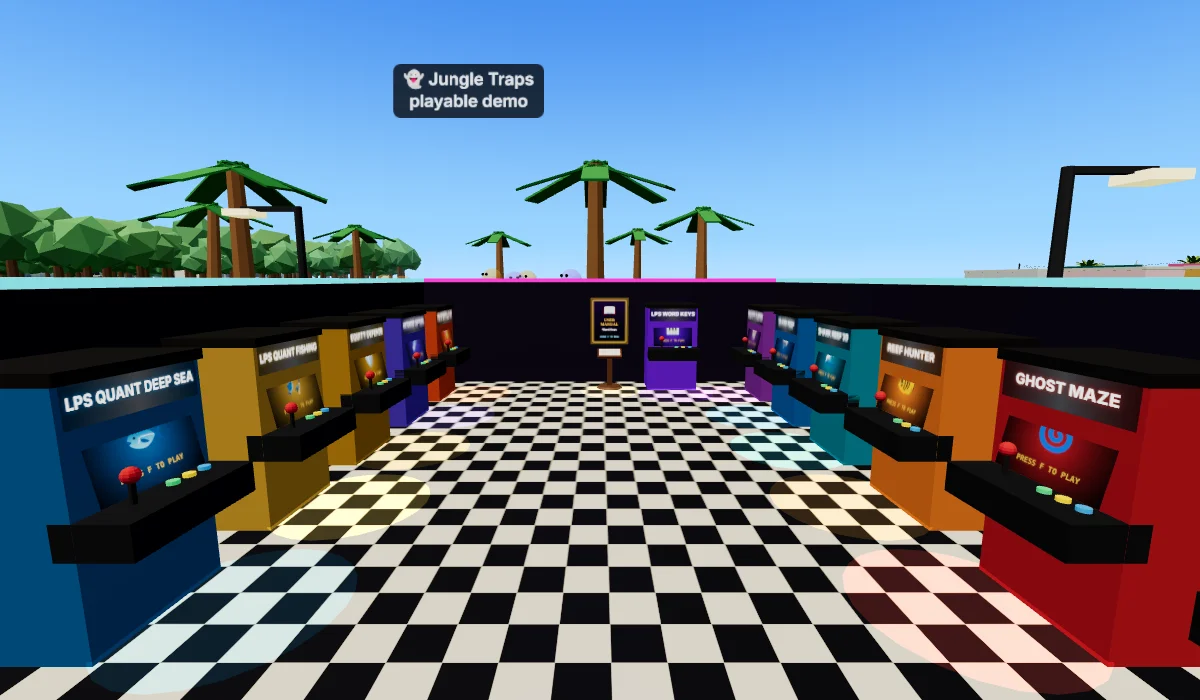
- LPS Wealth Street: walk into the 🕹️ LPS Arcade (west of the plaza, on Equity Ln between Wall St and Market Ave, or 🧭 Travel → Arcade). The Word Keys cabinet is on the back wall:
- Walk up to it and press F to play, or use 📖 How to play in its panel.
- Walk up to the 📖 user manual lectern beside it and press F to read this manual in the arcade.
- Press Esc or ✕ to walk back into the arcade.
15. Questions and fixes
I can't hear the piano.
Browsers start sound only after you click or tap, so click once inside the game. Check that 🔊 is on (not 🔇) and your device volume is up.
"My MT5/MT4" says my EA is offline.
Open MetaTrader with the LPS Link EA running on a chart and switch Algo Trading on. The status clears within a few seconds.
"No linked MT5/MT4 account yet".
Link your account in My Game Account on lpsnetwork.com, then switch to My MT5/MT4 again.
A trade wasn't sent.
The game tells you why: kill switch on, a risk-profile limit, a real-money order you didn't confirm, or the EA not answering within 20 seconds. If the EA was slow, check your account: the order may still have gone through.
My letter didn't count.
Letters fill the blue square only. If no square is blue, your typed letter goes to the first empty square. A wrong letter makes the word sink faster.
The word sank before I could finish.
Wrong letters and slow picks make it sink faster. Pick quickly, and use the letters already shown to work out the word.