1. Quick start
- Open the game. You start in the plaza by the fountain, with Ai, your AI dog.
- Walk (WASD) to a trading zone, or press 🧭 Travel (bottom right) to jump straight there. The Fishing Dock is east of the plaza.
- In the zone panel, pick which pairs swim there (up to 10).
- Right click for a green BUY net, left click for a red SELL net (or use the panel's net buttons).
- Wait for the cross: the first pair to cross your net's % level is your trade, with your stop and target.
2. The plaza and your screen
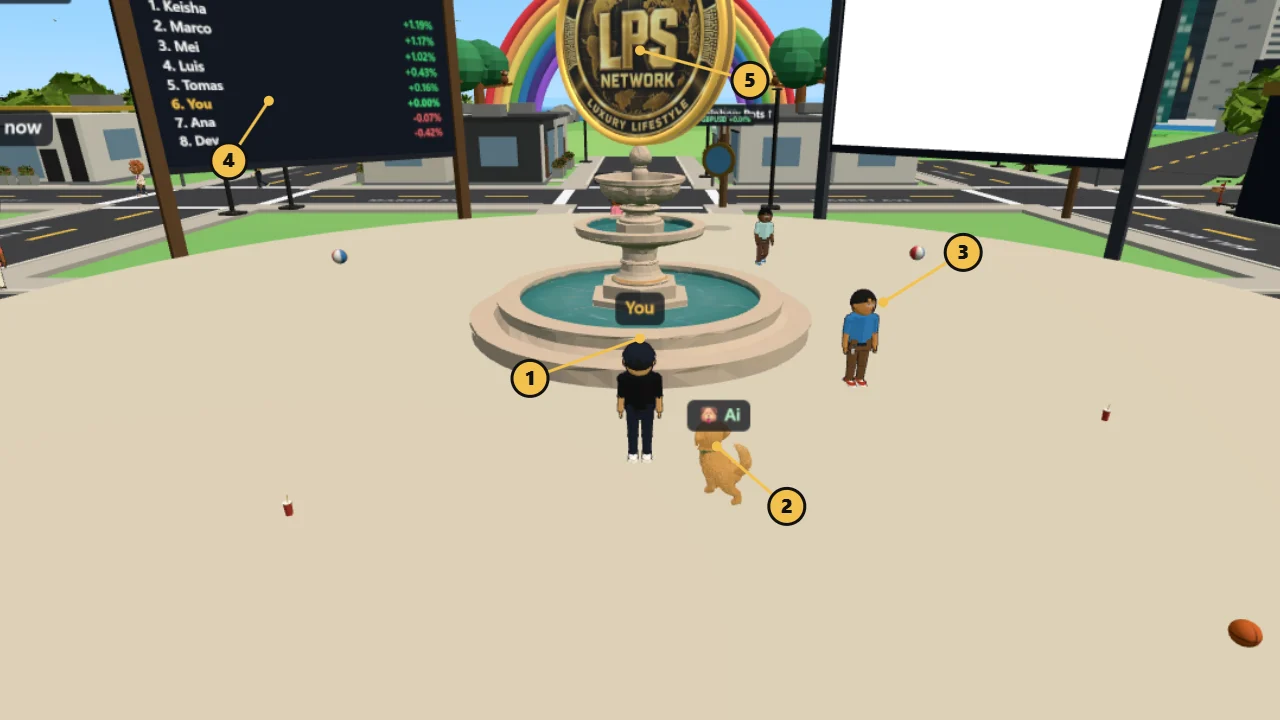
- 1You. Customize your look with Customize avatar in the panel.
- 2Ai, your AI dog: follows you, rides along in cars and on the jet ski.
- 3Other players, with their % gain today (never dollars).
- 4The Top hunters board: today's % leaderboard.
- 5The LPS Network rainbow at the heart of Wealth Street.
Top left is your account panel (balance, equity, today's %, margin level, your positions and MetaTrader orders). Top right is 🏆 Today's top hunters. Bottom left lists the controls; bottom right is 🧭 Travel & chat. Every panel can be minimized with its – button.
3. The map: where everything is
| Place | What you do there |
|---|---|
| 🌈 Rainbow Pots (north) | Set green and red pots under the rainbow. |
| 🎣 Fishing Dock (east) | Trap currency fish with nets in the water. |
| 🐦 Bird Forest (south) | Hang pending-order traps for the birds. |
| 👻 Jungle Traps (west) | Catch crypto ghosts (watch the gators). |
| 🕹️ Arcade · 🎪 Carnival | Play the LPS games and carnival games inside the world. New: the 🐈⬛ LPS Fat Cat and 🛸 LPS Vector-Lock Drone Range cabinets on the back wall, each with its user manual on the stand next to it. |
| 🛍️ Shop · 💼 Jobs · 🛍️ LPS Store | Merch, jobs and the LPS Network store. |
| 🏙️ Brickell | Drive north-east and take the elevator to the LPSQuant.com rooftop pool terrace. |
| 🏖️ Beach · ⚓ Marina · 🌴 Ocean Ave · ⛳ Golf | Jet skis, boats, the shore and the golf course. Pinecrest's big modern homes are nearby too. |
4. Hunting with nets
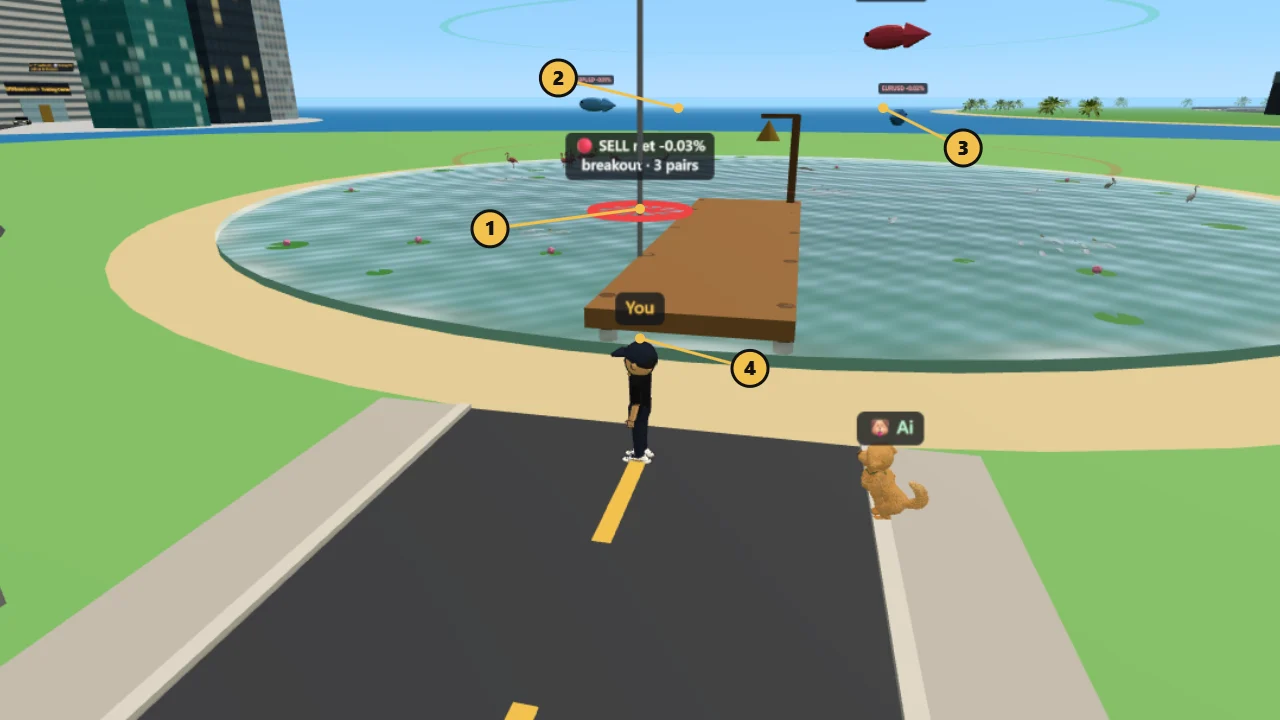
- 1Your SELL net and its label: % level, net style and how many pairs it watches.
- 2A currency fish, swimming at the height of its % move.
- 3Another pair in the zone: one net watches every pair you picked.
- 4You (and Ai).
- Pick the pairs for the zone in its panel (Market watch, up to 10).
- Hang a net: right click = green BUY net, left click = red SELL net. Choose the net style (e.g. Breakout: buy up / sell down), the net distance %, size, stop % and target %.
- Wait for the cross: the first pair to cross the net's % level becomes your trade. [ / ] raise or lower your newest net; ▲ ▼ in the panel move any net.
- Click a net (or Cancel) to take it down.
5. Lock-in, stops and targets
Every trade carries your stop and target. Halfway to the target the door shuts: profit is locked in and the stop trails behind the price. You can pull the trap at any time to close it. In the zones, the creature that guards your stop (like the alligator at the dock) is your stop loss.
6. The panel buttons
| Button | What it does |
|---|---|
| 🎲 GO | Wealth Street GO: the board game round the city. |
| 🐾 Hunt | Market Hunt: chase market creatures. |
| 👥 Crew | Style & Crew: your crew and their looks. |
| 🐶 Pet | Your AI dog, Ai. |
| 🤝 Friends | Add friends with a code, accept requests, jump to a friend. |
| 🏁 Race | The LPS Speedway. |
| Customize avatar | Your look: skin, hair, clothes, hats, accessories and LPS merch. |
| 🛑 Kill switch | Close everything and block new trades until you reset it. |
7. Cars, races and the rest of the world
Press F next to anything you can use: drive a car, ride, play an arcade cabinet or take an elevator. The car park has supercars and grand tourers; the Speedway has race cars with rails, and the Marina has jet skis. G grabs or drops a prop, T throws it and H holds hands with a friend. Click any billboard, video screen or sign for details: they're from real LPS partners.
🧟 Zombie outbreak

🧟 The full Zombie Invasion guide
⚠️ Read the warning first: the Book of Zombie Rules sits on a stand under a WARNING poster next to LPS Dead Market in the Arcade. Walk up and press F. Read every page: the most important part is on the last one.
How it starts: if the zombies get you in LPS Dead Market's Fun Mode, some of them follow you out through a portal into Wealth Street. They chase you and the townspeople, who run into the shops and pull the shutters down. Shutters open for you, never for a zombie. Bites take your health (the bar at the bottom); if they get you, you wake up at the fountain with a head start.
The code of the day is on the last page of the Book of Instructions, which hides somewhere new in town every day. Town announcements 📢 say which part of town. Solve two LPS Word Keys puzzles in a row and the machine prints a clue. Or ask Carlyne (Luxury Property Solutions) or DJ Phusion (Urban Gypsee): they know where it is today.
The armory: a steel STAFF ONLY door with a keypad. Where? The Book of Zombie Rules tells you. Enter the code of the day, walk in and press F at the racks to gear up: a blaster, a sword, zombie traps, portal traps and portal darts. The vault stays open for you all day.
Terminating them: the blaster and the sword knock zombies down, and zombie traps hold them, but they get back up. Only a portal sends them back into the game: set 🌀 portal traps (a zombie that walks in, or lies knocked down or trapped next to one, goes back), or throw a 🎯 portal dart, which sticks, detonates and sends that zombie straight back. Keys: 1-5 pick a weapon, X uses it on the nearest zombie, or click a zombie (on a phone, tap the weapon and ⚡ Use). Send every zombie back and the portal closes, the shutters go up and the townspeople you saved come back out.
8. Friends and the leaderboard
Everyone online walks the same street. Players only ever see your avatar name, your look, where you are and your % gain today, never dollars or your email. Add friends with your friend code or an invite link, and climb 🏆 Today's top hunters.
9. Practice and your MT5/MT4
Practice uses real market prices from the LPS feed and $10,000 of pretend money. Members can switch the top-left panel to My MT5/MT4. With the LPS Link EA running on your PC or VPS, every net that springs opens a real market order on your own account, with your stop, target, lock-in and kill switch. Real-money nets ask you to confirm when you set them. Your watchlists and risk profiles live in My Game Account (⚙️ My account, top centre).
10. Controls
| Key | Action |
|---|---|
| WASD / arrows · Shift | Move · run |
| Space | Jump |
| Q/E or drag · wheel | Turn · zoom |
| Right click / Left click | Green BUY net / red SELL net (click a net to cancel it) |
| [ / ] | Raise / lower your newest net |
| F | Use: drive, ride, play, elevator |
| G · T · H | Grab or drop · throw · hold hands |
11. Playing on a phone
A joystick and buttons appear on screen. You can move and resize them with ⚙️. The game lowers its own resolution on slower phones so it stays smooth.
12. Questions and fixes
| Problem | Fix |
|---|---|
| "No pairs on this net yet". | Pick some pairs in the zone panel's Market watch first. |
| My net never springs. | No pair has crossed its % level yet. Move it closer with [ / ] or the ▲ ▼ buttons. |
| I can't find a place. | Use 🧭 Travel (bottom right) to jump anywhere. |
| Live: nothing happens. | Check the Link EA is running with Algo Trading on, and the kill switch is off. |